|
As a first step you need to create a mail account.
To set up Microsoft Outlook Express, follow the instructions
below.
|
Incoming Mail
Server (POP3):
|
yourdomain.com
|
|
Outgoing Mail
Server (SMTP):
|
yourdomain.com
|
|
Username:
|
user@yourdomain.com
|
|
Password:
|
<your_mailbox_password>
|
| 1.
|
Open Microsoft Outlook
Express.
|
| 2.
|
Go to Tools ->
Accounts.... |
| 3.
|
On the Mail tab click the Add and select the Mail … item. |
| 4.
|
Enter your name as you want it to
appear in any messages you send, and click Next
>. |
| 5.
|
Type your e-mail address and
click Next >. |
| 6.
|
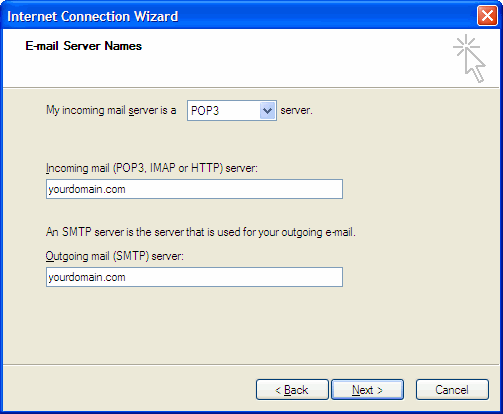
Select the POP3 protocol of your incoming mail server. Specify the
incoming and outgoing mail server and click Next
>. Make sure to replace
yourdomain.com with your actual domain name. |
| 7.
|
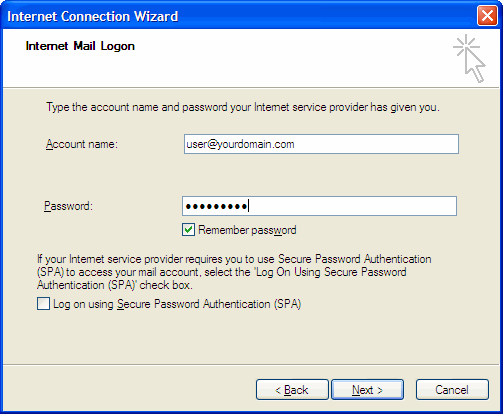
Type your e-mail address in
the Account name box. Type your mailbox password. Click
Next
>. |
| 9.
|
Select the newly added account and
click Properties. On the
Servers tab
check off the box labeled "My server requires
authentication." |
| 10.
|
Click Settings....
Make sure that the option "Use same settings as my incoming mail
server" is selected. Click OK. |
|

